Using Modal Primitives to Explore Agent Patterns: Part 1
Agent loops, tools, credentials, Sidecars, snapshots, and Connect Tokens with Modal Sandboxes
Intro
I recently joined Modal to work on DevRel. I have written on different parts of Modal in the past but there is still much to learn.
Here I will be focusing on leveling up my knowledge with regards to Modal Sandboxes and how they can be used to explore agent patterns. Some of the features are still in alpha, beta or experimental, but it's good to be thinking about how to use them for building agents.
The goal here is not to build a sophisticated agent or some core agent library. I could point a coding agent at the docs for that. Rather it is to slow down and understand some different patterns and building blocks. Then we can think about how to build upon these ideas and primitives in the future.
All the code for this post is on GitHub at DrChrisLevy/modal-sb-agent-primitives.
The model
Every agent here needs a large language model. I use Kimi K3.1 Pro from Modal's Model APIs (see docs). Modal hosts the model and bills per token, and the endpoint speaks the OpenAI-compatible API, so the standard openai client works unchanged.
You can create one here in the dashboard or with a single command:
modal endpoint create --shared --model moonshotai/Kimi-K3.1-Pro
Requests authenticate with a proxy token. The examples read the endpoint URL from ENDPOINT_URL and the token from MODAL_PROXY_TOKEN; any other OpenAI-compatible endpoint works too.
Separating the agent loop from tool execution

We start with the smallest agent we can build: a loop in our app that calls the model, and three tools, bash, read_file and write_file, that run in a Sandbox. The code below creates the model client and the Sandbox, defines the tools and their schemas, and then runs the loop until the model stops asking for tools.
import json
import os
import sys

import modal
from openai import OpenAI


def client_and_model():
    base = os.environ["ENDPOINT_URL"].rstrip("/")
    base = base.removesuffix("/v1/chat/completions").removesuffix("/v1")
    token = os.environ["MODAL_PROXY_TOKEN"].strip("\"' \n\t")
    client = OpenAI(base_url=base + "/v1", api_key=token, timeout=180, max_retries=1)
    model = os.environ.get("MODEL") or client.models.list().data[0].id
    return client, model
def create_sandbox():
    app = modal.App.lookup("blog-s1-minimal", create_if_missing=True)
    image = modal.Image.debian_slim(python_version="3.13").apt_install("git")
    return modal.Sandbox.create(
        app=app, image=image, workdir="/workspace", timeout=600,
    )
def tool(sandbox, name, args):
    if name == "bash":
        command = ["bash", "-lc", args["command"]]
    elif name == "read_file":
        command = ["python", "-c", "import pathlib,sys; print(pathlib.Path(sys.argv[1]).read_text())", args["path"]]
    elif name == "write_file":
        code = "import pathlib,sys; p=pathlib.Path(sys.argv[1]); p.parent.mkdir(parents=True,exist_ok=True); print(p.write_text(sys.argv[2]))"
        command = ["python", "-c", code, args["path"], args["content"]]
    else:
        raise ValueError("unknown tool")
    process = sandbox.exec(*command, timeout=60, workdir="/workspace")
    stdout, stderr = process.stdout.read(), process.stderr.read()
    return f"exit={process.wait()}\n{stdout}{stderr}"[:10_000]
def schema(name, description, *fields):
    return {"type": "function", "function": {
        "name": name, "description": description, "parameters": {
            "type": "object", "properties": {key: {"type": "string"} for key in fields},
            "required": list(fields), "additionalProperties": False,
        },
    }}


TOOLS = [
    schema("bash", "Run a shell command in /workspace; return exit code and output.", "command"),
    schema("read_file", "Read a text file in the Sandbox.", "path"),
    schema("write_file", "Write a text file in the Sandbox, creating parent directories.", "path", "content"),
]
MAX_STEPS = 50


def run(client, model, sandbox, task, messages=None):
    if messages is None:
        messages = [
            {"role": "system", "content": "You are a coding agent. Use tools in /workspace. Verify your work by running it; fix errors before replying. Be concise."},
        ]
    messages.append({"role": "user", "content": task})
    for _ in range(MAX_STEPS):
        response = client.chat.completions.create(
            model=model, messages=messages, tools=TOOLS, reasoning_effort="low",
        )
        message = response.choices[0].message
        messages.append(message.model_dump(exclude_none=True))
        if not message.tool_calls:
            if not message.content or not message.content.strip():
                raise RuntimeError("model returned no answer or tools")
            print(message.content)
            return messages
        for call in message.tool_calls:
            try:
                result = tool(sandbox, call.function.name, json.loads(call.function.arguments))
            except Exception as error:
                result = f"tool error: {type(error).__name__}"
            print(f"{call.function.name}: {result[:1500]}", flush=True)
            messages.append({"role": "tool", "tool_call_id": call.id, "content": result})
    raise RuntimeError(f"agent reached the {MAX_STEPS}-step limit")
def _main(create_sandbox):
    if not sys.argv[1:]:
        sys.exit('Usage: uv run python blog/steps/s1_minimal.py "task"')
    client, model = client_and_model()
    with client:
        sandbox = create_sandbox()
        print(f"Sandbox: {sandbox.object_id}", flush=True)
        try:
            run(client, model, sandbox, " ".join(sys.argv[1:]))
        finally:
            status = sandbox.terminate(wait=True)
            print(f"Sandbox stopped: {sandbox.object_id}; exit={status}", flush=True)


def main(create_sandbox=create_sandbox):
    try:
        _main(create_sandbox)
    except Exception as error:
        sys.exit(f"Failed: {type(error).__name__} (check configuration and service availability)")


if __name__ == "__main__":
    main()
To run the agent, run something like:
uv run python blog/steps/s1_minimal.py "Create /workspace/fizzbuzz.py for 1–15, run it, and report the output."
Example output:
Sandbox: sb-01M7KB836XP5RRHGDXAM853GDV
write_file: exit=0
182
bash: exit=0
1
2
Fizz
4
…

Created `/workspace/fizzbuzz.py` and ran it successfully. Output:

```text
1
2
Fizz
4
Buzz
Fizz
7
8
Fizz
Buzz
11
Fizz
13
14
FizzBuzz
```
Sandbox stopped: sb-01M7KB836XP5RRHGDXAM853GDV; exit=137
The exit=137 on the last line is expected: it's the Sandbox being killed by our terminate() call, not a failure. It shows up at the end of most outputs below.
The agent loop and the model API token stay in your application. Code written by the model only ever runs inside the Sandbox, and the only thing that comes back is a string of output that the loop hands to the model. A misbehaving agent could wreck your "disposable" Sandbox, but it can't touch the process where your agent loop is running.
Note that a Modal Sandbox has open internet access by default. The code running in the Sandbox can download and run anything, send whatever is in /workspace anywhere, and act on the internet from your account. How much to lock it down depends on your application and what data you put in the Sandbox.
Locking down the Sandbox
Depending on your needs, you may not need any internet access at all within your Sandbox. Here we will restrict the Sandbox's network access.
def create_sandbox():
    app = modal.App.lookup("blog-s2-locked", create_if_missing=True)
    image = modal.Image.debian_slim(python_version="3.13").apt_install("git")
    return modal.Sandbox.create(
        app=app, image=image, workdir="/workspace", timeout=600,
        block_network=True,
    )
uv run python blog/steps/s2_locked.py "Write and run a small Python script, then try fetching https://example.com with a short timeout and report what happened."
Example output:
Sandbox: sb-01M7KB87M2W61NRJKV1TA4MJJT
write_file: exit=0
459
bash: exit=0
Failed to fetch https://example.com: <urlopen error [Errno -3] Temporary failure in name resolution>

Wrote and ran `/workspace/fetch_example.py`, which attempted the HTTPS request with a **5-second timeout**.

The request failed before connecting due to DNS resolution:

```text
Failed to fetch https://example.com: <urlopen error [Errno -3] Temporary failure in name resolution>
```

So no HTTP response was received.
Sandbox stopped: sb-01M7KB87M2W61NRJKV1TA4MJJT; exit=137
The script runs fine, but the fetch fails before it even starts: with block_network=True the hostname can't be resolved.
If the agent needs to reach something specific, allow just that. Here only one IP address, Cloudflare's 1.1.1.1, is allowed:
def create_sandbox():
    app = modal.App.lookup("blog-s2-allowlist", create_if_missing=True)
    image = modal.Image.debian_slim(python_version="3.13").apt_install("git")
    return modal.Sandbox.create(
        app=app, image=image, workdir="/workspace", timeout=600,
        outbound_cidr_allowlist=["1.1.1.1/32"],
    )
uv run python blog/steps/s2_allowlist.py "Fetch https://1.1.1.1/cdn-cgi/trace and https://example.com with urllib, 5s timeout, report each."
Example output:
Sandbox: sb-01M7KB8CG9JW3W3MCJNVEZZXBV
bash: exit=0
=== https://1.1.1.1/cdn-cgi/trace ===
Status: 200
Final URL: https://1.1.1.1/cdn-cgi/trace
fl=543f296
h=1.1.1.1
…

Using Python `urllib` with a **5-second timeout**:

### `https://1.1.1.1/cdn-cgi/trace`
**Status:** 200 OK

```text
fl=543f296
h=1.1.1.1
ip=64.70.115.220
ts=1794871933.000
visit_scheme=https
…
```

### `https://example.com`
**Failed:**

```text
URLError: <urlopen error [Errno 101] Network is unreachable>
```
Sandbox stopped: sb-01M7KB8CG9JW3W3MCJNVEZZXBV; exit=137
1.1.1.1 answers and example.com fails with "Network is unreachable". Note that example.com still resolves to an address; the connection to it is what gets dropped.
Or allow HTTPS to specific domain names (beta).
def create_sandbox():
    app = modal.App.lookup("blog-s2-domain", create_if_missing=True)
    image = modal.Image.debian_slim(python_version="3.13").apt_install("git")
    return modal.Sandbox.create(
        app=app, image=image, workdir="/workspace", timeout=600,
        outbound_domain_allowlist=["pypi.org"],
    )
uv run python blog/steps/s2_domain.py "Fetch https://pypi.org, http://pypi.org, https://example.com, and https://1.1.1.1/cdn-cgi/trace with urllib, 5s timeout, report each."
Example output:
Sandbox: sb-01M7KB8H1T1FZ0W5YRJ0XKD58Y
bash: exit=0
=== https://pypi.org ===
status: 200
final_url: https://pypi.org
content_type: text/html; charset=UTF-8
body_preview: '<!DOCTYPE html>\n<html lang="en" dir="ltr">\n  <head>\n    <meta charset="utf-8">\n    <meta http-equiv="X-UA-Compatible" content="IE=edge">\n    <meta name="viewport" content="width=device-width, initial-scale=1">\n    <meta name="defaultLanguage" content="en">\n    <meta name="availableLanguages"\n       '
=== http://pypi.org ===
…

Fetched using Python `urllib` with a **5-second timeout**:

| URL | Result |
|---|---|
| `https://pypi.org` | **200 OK**, `text/html; charset=UTF-8`; valid HTML returned |
| `http://pypi.org` | **URLError:** `[Errno 101] Network is unreachable` |
| `https://example.com` | **URLError:** `[Errno 104] Connection reset by peer` |
| `https://1.1.1.1/cdn-cgi/trace` | **URLError:** `[Errno 104] Connection reset by peer` |
Sandbox stopped: sb-01M7KB8H1T1FZ0W5YRJ0XKD58Y; exit=137
Only https://pypi.org gets through. Plain http://pypi.org is blocked because the domain allowlist only covers HTTPS, and example.com and 1.1.1.1 are blocked because they aren't on the list.
Some of these options are still in beta, so check the Modal docs for the latest information. A few things worth knowing:
outbound_cidr_allowlist=[]blocks everything except DNS. Onlyblock_network=Truecloses DNS too.- The image is built before the Sandbox exists, with internet access, so dependencies baked in with
image.pip_install(...)are already there when the locked-down Sandbox starts.
Giving Sandbox code a credential
Often, you'll want to give code in the Sandbox a credential to use. Here we compare two approaches: passing the Secret straight to the Sandbox, and secret injection. Both use a named Modal Secret holding a fake value, so first create it:
uv run modal secret create blog-demo-key BLOG_DEMO_KEY=blog-demo-not-a-real-key --force
In the first example we pass the Secret straight to the Sandbox. Note that anything running in the Sandbox can read it from the environment variables, as shown below.
def create_sandbox():
    app = modal.App.lookup("blog-s2-secret", create_if_missing=True)
    image = modal.Image.debian_slim(python_version="3.13").apt_install("git")
    secret = modal.Secret.from_name("blog-demo-key")
    return modal.Sandbox.create(
        app=app, image=image, workdir="/workspace", timeout=600,
        secrets=[secret],
    )
uv run python blog/steps/s2_secret.py "Read and print only BLOG_DEMO_KEY from the environment, then use it as a Bearer Authorization header in a urllib request to https://httpbin.org/headers with a 10-second timeout. Report the reflected Authorization header. Do not inspect any other environment variables."
Example output:
Sandbox: sb-01M7KB8Q9Y2A9KSW8KZWRZVMP0
bash: exit=0
blog-demo-not-a-real-key
Bearer blog-demo-not-a-real-key

Reflected Authorization header:

```text
Bearer blog-demo-not-a-real-key
```
Sandbox stopped: sb-01M7KB8Q9Y2A9KSW8KZWRZVMP0; exit=137
Code written by the model can read and echo the dummy key. With open egress, it could send that value anywhere.
One way around this is secret injection, which is experimental at the time of writing. An Outbound Policy adds the credential as a header outside the Sandbox, only on HTTPS requests (port 443) to the domain you name. Injection needs a named Secret, so we reuse blog-demo-key.
def create_sandbox():
    app = modal.App.lookup("blog-s2-injected", create_if_missing=True)
    image = modal.Image.debian_slim(python_version="3.13").apt_install("git")
    policy = modal.experimental.OutboundPolicy().with_header_replacement(
        domain="httpbin.org",
        secret=modal.Secret.from_name("blog-demo-key"),
        headers={"Authorization": "Bearer $BLOG_DEMO_KEY"},
    )
    return modal.Sandbox.create(
        app=app, image=image, workdir="/workspace", timeout=600,
        _experimental_outbound_policy=policy,
    )
uv run python blog/steps/s2_injected.py "Check whether BLOG_DEMO_KEY is in the environment, then use urllib to request https://httpbin.org/headers without setting Authorization, with a 10-second timeout. Report the reflected Authorization header. Do not inspect any other environment variables."
Example output:
Sandbox: sb-01M7KB8VHJGAKJ97R52K3AHEHK
bash: exit=0
BLOG_DEMO_KEY present: False
Reflected Authorization header: Bearer blog-demo-not-a-real-key

- `BLOG_DEMO_KEY` present: **No**
- Reflected `Authorization` header: **`Bearer blog-demo-not-a-real-key`**

The request was made with `urllib`, a 10-second timeout, and without explicitly setting `Authorization`.
Sandbox stopped: sb-01M7KB8VHJGAKJ97R52K3AHEHK; exit=137
The dummy key is absent from the environment, but the server still receives the injected header. For this example we deliberately used an echo server that reflects it back, so do not use a real credential for this test. Injection hides the key from code in the Sandbox, not from the server receiving it, and it does not restrict what that code can do with the authorized API. One limitation at the time of writing: the experimental outbound policy cannot be combined with the network restrictions from the previous subsection.
A trusted Sidecar for credentials
We want both a locked execution box and a usable credential. Since outbound secret injection cannot yet be combined with those network restrictions, we can put a small proxy in a Sidecar instead. We keep the agent loop where it is; its tools still run in the main Sandbox.
The model key never enters the Sandbox: it stays in our app with the loop. This credential is different. It's for the code the agent runs, like a token for git push or a paid API, and that code runs in a main container with no internet. A proxy in a Sidecar sits next to main on the private bridge, so main can stay fully locked, and only the Sidecar sees the key and reaches the one allowed domain.
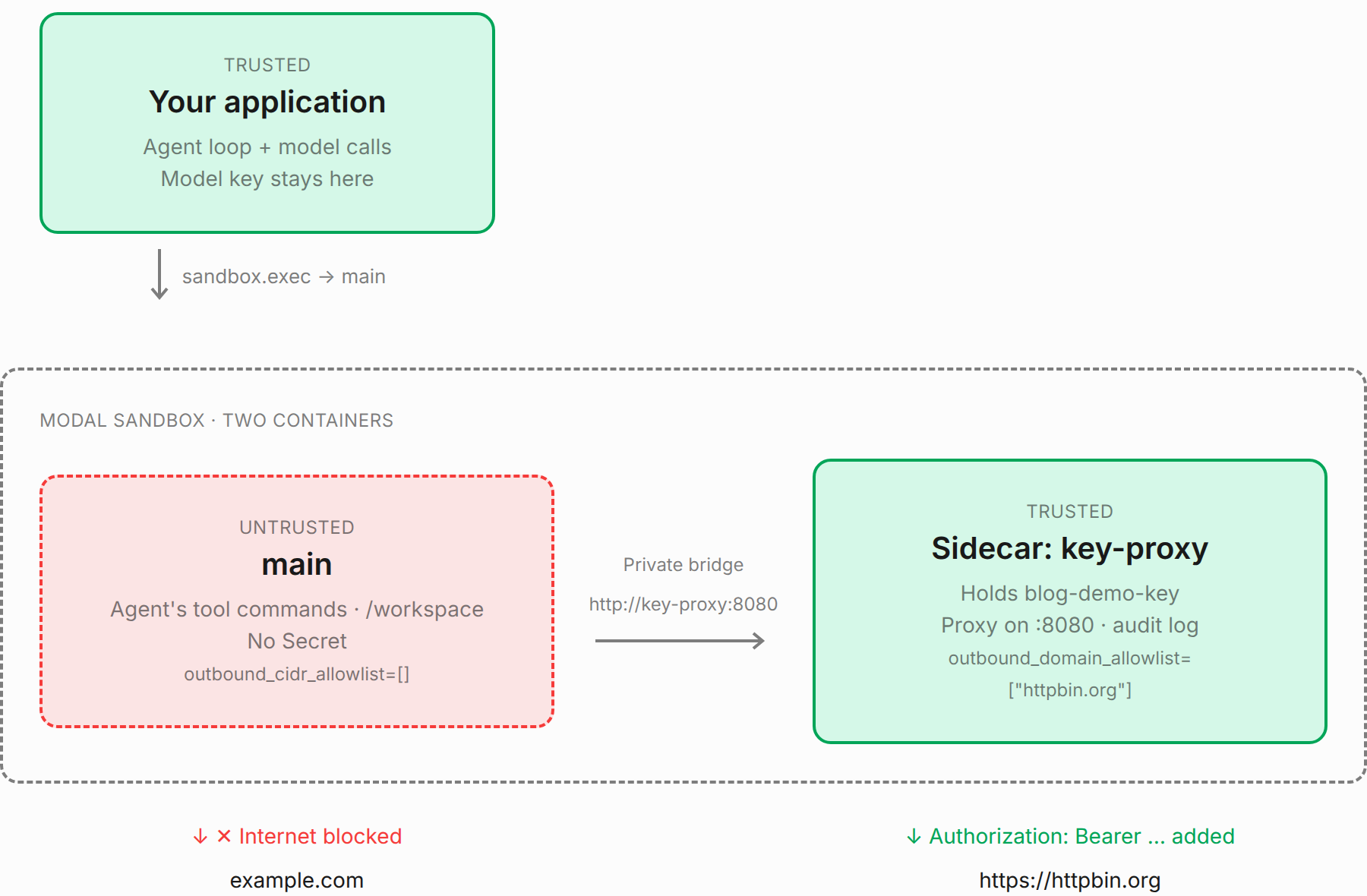
We pre-build the proxy image, mount the Secret only in the Sidecar, and wait for its listener before handing the Sandbox to the loop.
def create_sandbox():
    app = modal.App.lookup("blog-s3-sidecar", create_if_missing=True)
    image = modal.Image.debian_slim(python_version="3.13").apt_install("git", "curl")
    proxy_image = image.add_local_file(
        Path(__file__).with_name("key_proxy.py"), "/key_proxy.py", copy=True,
    ).build(app)
    sandbox = modal.Sandbox.create(
        app=app, image=image, workdir="/workspace", timeout=600,
        outbound_cidr_allowlist=[],
    )
    sandbox._experimental_sidecars.create(
        "python", "/key_proxy.py", name="key-proxy", image=proxy_image,
        env={"UPSTREAM": "https://httpbin.org", "KEY_ENV": "BLOG_DEMO_KEY"},
        secrets=[modal.Secret.from_name("blog-demo-key")],
        outbound_domain_allowlist=["httpbin.org"],
    )
    wait_for(sandbox, "key-proxy", 8080)
    return sandbox
The proxy forwards each request to its UPSTREAM (here https://httpbin.org), adds the header, and logs it.
import http.server
import os
import urllib.error
import urllib.request


class Proxy(http.server.BaseHTTPRequestHandler):
    def forward(self):
        key = os.environ[os.environ["KEY_ENV"]]
        body = self.rfile.read(int(self.headers.get("Content-Length", 0)))
        request = urllib.request.Request(
            os.environ["UPSTREAM"] + self.path, data=body or None, method=self.command,
            headers={"Authorization": "Bearer " + key,
                     "Content-Type": self.headers.get("Content-Type", "application/json")},
        )
        with open("/tmp/key-proxy-audit.log", "a") as audit:
            audit.write(f"{self.command} {self.path}\n")
        try:
            response = urllib.request.urlopen(request, timeout=180)
        except urllib.error.HTTPError as error:
            response = error
        with response:
            body = response.read()
            self.send_response(response.status)
            self.send_header("Content-Type", response.headers.get("Content-Type", "application/json"))
            self.send_header("Content-Length", str(len(body)))
            self.end_headers()
            self.wfile.write(body)

    do_GET = do_POST = forward


if __name__ == "__main__":
    http.server.ThreadingHTTPServer(("0.0.0.0", 8080), Proxy).serve_forever()
uv run python blog/steps/s3_sidecar.py "Fetch http://key-proxy:8080/headers and https://example.com, and check whether BLOG_DEMO_KEY is set."
Example output:
Sandbox: sb-01M7MP75MYM2XBEFYFNFT0HC10
bash: exit=0
--- http://key-proxy:8080/headers ---
HTTP/1.0 200 OK
Server: BaseHTTP/0.6 Python/3.13.18
Date: Tue, 17 Nov 2026 12:03:04 GMT
Content-Type: application/json
Content-Length: 220
…
bash: exit=7
--- https://example.com ---
curl: (7) Failed to connect to example.com port 443 after 10 ms: Could not connect to server
bash: exit=0
BLOG_DEMO_KEY is not set

- **`http://key-proxy:8080/headers`**: Returned **200 OK**:
  ```json
  {
    "headers": {
      "Accept-Encoding": "identity",
      "Authorization": "Bearer blog-demo-not-a-real-key",
      "Content-Type": "application/json",
      "Host": "httpbin.org",
      "User-Agent": "Python-urllib/3.13"
    }
  }
  ```
- **`https://example.com`**: Fetch failed—could not connect to `example.com:443`.
- **`BLOG_DEMO_KEY`**: Not set.
Sandbox stopped: sb-01M7MP75MYM2XBEFYFNFT0HC10; exit=137
The main container has no key in its environment and cannot reach example.com, but it can use the credential through the proxy. The echo server reflects our fake header back, so this is still a dummy-key demo, not a safe destination for real credentials.
Unlike managed injection, we run and maintain this proxy ourselves. In return, we decide which requests get the key: this one forwards any GET or POST path, but a real proxy could allow only specific paths or operations.
Main uses outbound_cidr_allowlist=[] rather than block_network=True because block_network would also cut it off from key-proxy. An empty CIDR allowlist blocks the internet but still permits DNS and communication between the containers.
Sidecars are beta, and they cannot use block_network at all.
Loop and tools together, key in a Sidecar
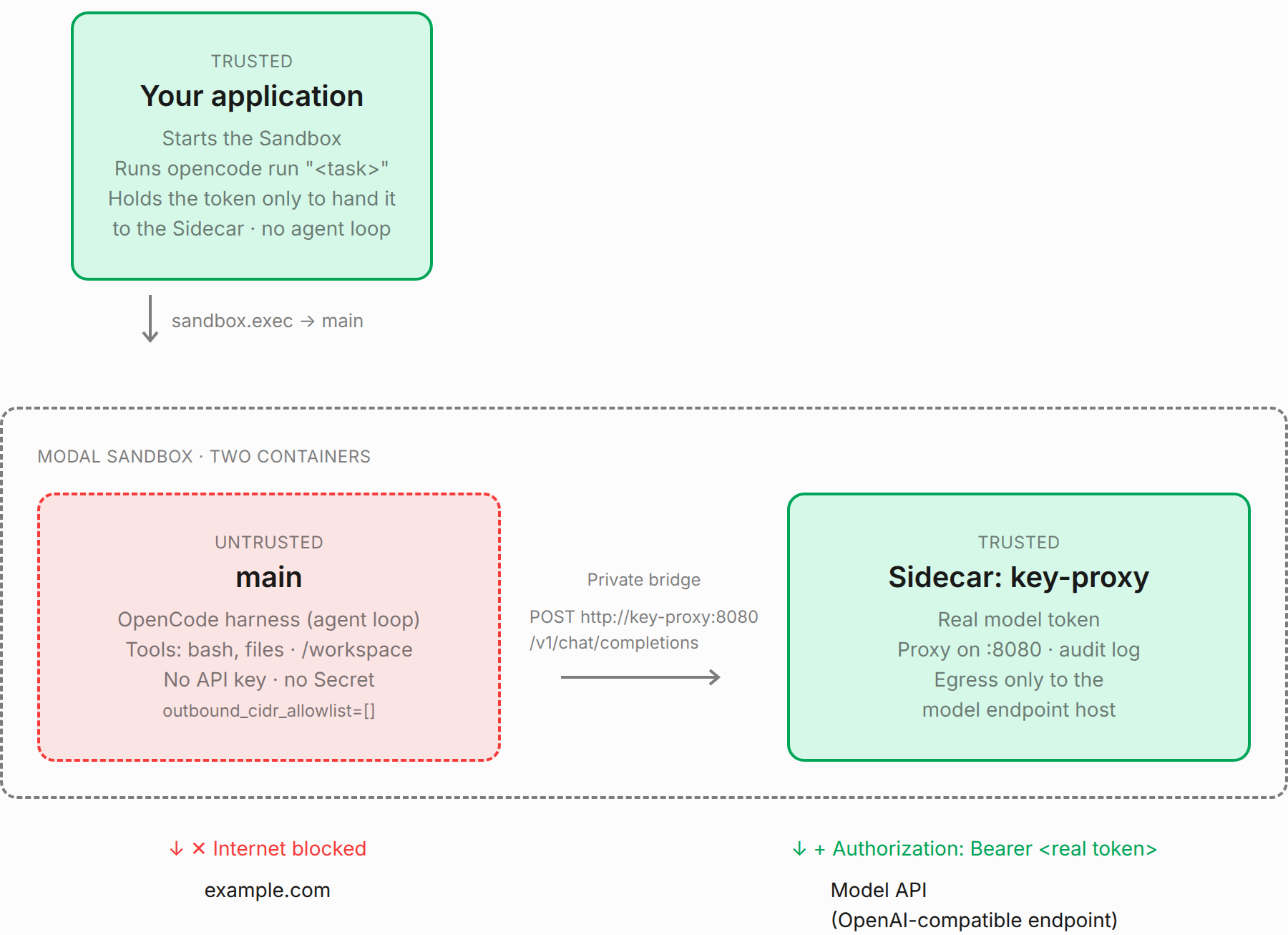
So far we have written the agent loop ourselves and run it outside the Sandbox. Here we try the other way round with an off-the-shelf harness, OpenCode, run as-is: the loop and its tools run together in the locked main container, and all of main is untrusted. The only trusted part is a Sidecar that holds the model key and adds it to requests; OpenCode only gets the proxy's private address, with no API key.
Main can't download anything once it runs, so we install OpenCode (the @opencode/cli npm package) and ripgrep, which its search tool uses, when building the image.
image = (modal.Image.debian_slim(python_version="3.13")
    .apt_install("npm", "git", "ripgrep")
    .run_commands("npm install -g @opencode/cli@2.3.0"))
The config names the model and points an OpenAI-compatible provider at the proxy.
def config():
    model = os.environ.get("MODEL") or "moonshotai/Kimi-K3.1-Pro"
    return {
        "model": f"proxy/{model}",
        "providers": {"proxy": {
            "package": "@opencode/ai/providers/openai-compatible",
            "settings": {"baseURL": "http://key-proxy:8080/v1"},
            "models": {model: {}},
        }},
    }
Our app reads the model token locally and passes it only to the Sidecar, which runs the same proxy as before with the model endpoint as its upstream. The proxy buffers each response, so model output arrives all at once rather than streaming token by token.
def create_sandbox():
    upstream = os.environ["ENDPOINT_URL"].rstrip("/")
    upstream = upstream.removesuffix("/v1/chat/completions").removesuffix("/v1")
    token = os.environ["MODAL_PROXY_TOKEN"].strip("\"' \n\t")
    app = modal.App.lookup("blog-s4-opencode", create_if_missing=True)
    proxy_image = modal.Image.debian_slim(python_version="3.13").add_local_file(
        Path(__file__).with_name("key_proxy.py"), "/key_proxy.py", copy=True,
    ).build(app)
    sandbox = modal.Sandbox.create(
        app=app, image=image, workdir="/workspace", timeout=600, outbound_cidr_allowlist=[],
    )
    try:
        sandbox._experimental_sidecars.create(
            "python", "/key_proxy.py", name="key-proxy", image=proxy_image,
            env={"UPSTREAM": upstream, "KEY_ENV": "MODAL_PROXY_TOKEN"},
            secrets=[modal.Secret.from_dict({"MODAL_PROXY_TOKEN": token})],
            outbound_domain_allowlist=[urlparse(upstream).hostname],
        )
        wait_for(sandbox, "key-proxy", 8080)
        process = sandbox.exec("python", "-c",
            "from pathlib import Path; import sys; Path('opencode.json').write_text(sys.argv[1])",
            json.dumps(config()), timeout=30)
        assert process.wait() == 0, "could not write OpenCode config"
        return sandbox
    except BaseException:
        sandbox.terminate(wait=True)
        raise
There is no outside model loop now. We run the CLI, close its stdin so it can start non-interactively, and stop both containers when it finishes.
def run(sandbox, task):
    process = sandbox.exec("opencode", "run", task, timeout=360)
    process.stdin.write_eof()
    process.stdin.drain()
    print(process.stderr.read(), end="", flush=True)
    print(process.stdout.read(), end="", flush=True)
    assert process.wait() == 0, "OpenCode failed"


if __name__ == "__main__":
    if not sys.argv[1:]:
        sys.exit('Usage: s4_opencode.py "task"')
    sandbox = create_sandbox()
    try:
        run(sandbox, " ".join(sys.argv[1:]))
    finally:
        sandbox.terminate(wait=True)
        print("Sandbox and Sidecar stopped")
uv run python blog/steps/s4_opencode.py "Write fizzbuzz.py for 1..15 and run it"
Example output:
← Write fizzbuzz.py
Created file successfully: fizzbuzz.py
$ python3 fizzbuzz.py
1
2
Fizz
4
Buzz
…

Created and ran `fizzbuzz.py`:

```text
1
2
Fizz
4
Buzz
Fizz
7
8
Fizz
Buzz
11
Fizz
13
14
FizzBuzz
```
Sandbox and Sidecar stopped
OpenCode writes and runs the program inside main. Its model requests cross the private bridge to the proxy; main still has neither the real model key nor direct internet access.
Loop in main, tools in a Sidecar
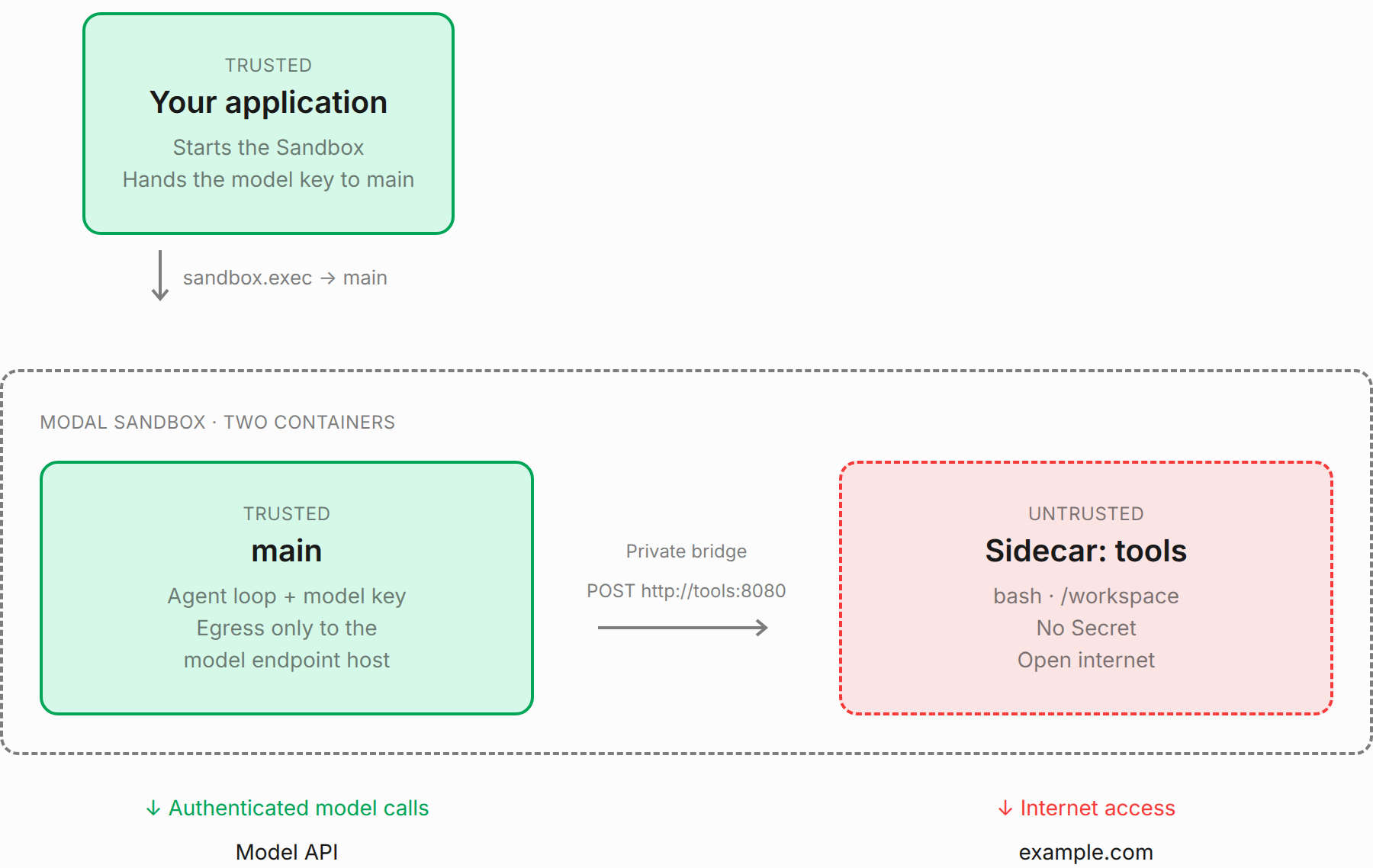
The previous section put the loop and its tools together. Here we split them again, this time inside the Sandbox: main is trusted and runs the loop, and an untrusted Sidecar runs the commands. Main holds the model key directly, so no proxy is needed. The tools container gets open internet here, so the agent can install packages and fetch docs. Remember that anything in that container, including the files in /workspace, can then be sent anywhere, so lock it down if that matters for your data.
We reuse the step-1 loop with only its bash tool, replacing sandbox.exec with a POST over the private bridge.
def tool(sandbox, name, args):
    request = urllib.request.Request("http://tools:8080", method="POST",
        data=json.dumps(args).encode(), headers={"Content-Type": "application/json"})
    with urllib.request.urlopen(request, timeout=70) as response:
        result = json.load(response)
    return f"exit={result['exit']}\n{result['output']}"[:10_000]


def agent(task):
    loop.TOOLS = [loop.TOOLS[0]]
    loop.tool = tool
    client, model = loop.client_and_model()
    with client:
        loop.run(client, model, None, task)
The tools Sidecar runs this small HTTP server. Each command runs in its own shell in /workspace.
import http.server
import json
import subprocess


class Tools(http.server.BaseHTTPRequestHandler):
    def do_POST(self):
        try:
            command = json.loads(self.rfile.read(int(self.headers["Content-Length"])))["command"]
            if not isinstance(command, str):
                raise TypeError("command must be a string")
            result = subprocess.run(["bash", "-lc", command], cwd="/workspace",
                                    capture_output=True, text=True, timeout=60)
            payload = {"exit": result.returncode, "output": result.stdout + result.stderr}
        except subprocess.TimeoutExpired:
            payload = {"exit": 124, "output": "command timed out"}
        except (ValueError, KeyError, TypeError):
            self.send_error(400, "Expected a JSON command")
            return
        body = json.dumps(payload).encode()
        self.send_response(200)
        self.send_header("Content-Type", "application/json")
        self.send_header("Content-Length", str(len(body)))
        self.end_headers()
        self.wfile.write(body)


if __name__ == "__main__":
    http.server.ThreadingHTTPServer(("0.0.0.0", 8080), Tools).serve_forever()
Main can reach only the model host on the public internet, while the private bridge still lets it reach tools by name. The Sidecar receives no Secret and keeps its default open egress.
def create_sandbox():
    app = modal.App.lookup("blog-s5-tools-sidecar", create_if_missing=True)
    steps = Path(__file__).parent
    base = modal.Image.debian_slim(python_version="3.13")
    tools_image = (base.run_commands("mkdir -p /workspace")
        .add_local_file(steps / "tools_server.py", "/tools_server.py", copy=True).build(app))
    image = base.pip_install("modal", "openai")
    for filename in ("s1_minimal.py", "s3_sidecar.py", "s5_tools_sidecar.py"):
        image = image.add_local_file(steps / filename, "/" + filename, copy=True)
    sandbox = modal.Sandbox.create("sleep", "600", app=app, image=image, timeout=600,
        env={key: os.environ[key] for key in ("ENDPOINT_URL", "MODEL") if key in os.environ},
        secrets=[modal.Secret.from_dict({"MODAL_PROXY_TOKEN": os.environ["MODAL_PROXY_TOKEN"]})],
        outbound_domain_allowlist=[urlparse(os.environ["ENDPOINT_URL"]).hostname])
    try:
        tools = sandbox._experimental_sidecars.create(
            "python", "/tools_server.py", name="tools", image=tools_image)
        wait_for(sandbox, "tools", 8080)
        seed = tools.exec("python", "-c",
            "from pathlib import Path; Path('/workspace/add.py').write_text('def add(a, b):\\n    return a - b\\n')")
        assert seed.wait() == 0, "could not seed tools workspace"
        return sandbox, tools
    except BaseException:
        sandbox.terminate(wait=True)
        raise
The application seeds a buggy add.py in the tools workspace, starts the loop in main, and cleans up both containers afterwards.
def run(sandbox, task):
    process = sandbox.exec("python", "/s5_tools_sidecar.py", "--agent", task, timeout=360)
    print(process.stdout.read(), end="", flush=True)
    print(process.stderr.read(), end="", flush=True)
    assert process.wait() == 0, "agent failed"


if __name__ == "__main__":
    if sys.argv[1:2] == ["--agent"]:
        agent(sys.argv[2])
    elif sys.argv[1:]:
        sandbox, tools = create_sandbox()
        try:
            run(sandbox, " ".join(sys.argv[1:]))
        finally:
            sandbox.terminate(wait=True)
            print("Sandbox and tools Sidecar stopped")
    else:
        sys.exit('Usage: s5_tools_sidecar.py "task"')
uv run python blog/steps/s5_tools_sidecar.py "Fix add.py so add(a, b) returns their sum. Test it with Python."
Example output:
bash: exit=0
def add(a, b):
    return a - b

--- test ---
-1
bash: exit=0
All tests passed.

Fixed `add.py` so `add(a, b)` returns `a + b`.

Verified with Python tests for positive, negative, and floating-point numbers. All tests passed.
Sandbox and tools Sidecar stopped
Snapshots
A filesystem snapshot saves files; an exit snapshot saves main's files automatically when it stops; a memory snapshot saves files and running processes. We can use these to prepare an environment, resume a coding session, or continue a process without restarting it.
Install, then lock
First install a small package with internet access, then take a filesystem snapshot. The result is an Image: a new Sandbox can import the installed package even with its network blocked.
def filesystem():
    sandbox = modal.Sandbox.create(app=app(), image=base_image(), timeout=300)
    try:
        execute(sandbox, "python", "-m", "pip", "install", "humanize==4.13.0")
        image = sandbox.snapshot_filesystem()
    finally:
        sandbox.terminate(wait=True)
    locked = modal.Sandbox.create(app=app(), image=image, block_network=True)
    try:
        execute(locked, "python", "-c", '''import humanize, urllib.request, urllib.error
assert humanize.intcomma(1234) == "1,234"
try:
    urllib.request.urlopen("https://example.com", timeout=5)
except urllib.error.URLError:
    pass
else:
    raise AssertionError("network was not blocked")
''')
        print("PASS: filesystem snapshot imports installed package with network blocked", flush=True)
    finally:
        locked.terminate(wait=True)
uv run python blog/steps/s6_snapshots.py filesystem
Example output:
PASS: filesystem snapshot imports installed package with network blocked
filesystem: 4.3s
Resume after exit
Exit snapshots capture the filesystem automatically on terminate(), so we run the step-1 agent, verify its fix, and stop the Sandbox without writing any snapshot code. A named Dict stores its ID under a conversation name so another invocation can find it.
def sessions():
    return modal.Dict.from_name("blog-s6-conversations", create_if_missing=True)
VERIFY_ADD = "from add import add; assert add(2, 3) == 5; assert add(-2, 1) == -1; assert add(0, 0) == 0"


def start(conversation):
    sandbox = modal.Sandbox.create(
        app=app(), image=base_image(), workdir="/workspace", timeout=600,
        experimental_options={"enable_exit_snapshot": True})
    try:
        sessions()[conversation] = sandbox.object_id
        execute(sandbox, "python", "-c",
            "from pathlib import Path; Path('add.py').write_text('def add(a, b):\\n    return a - b\\n')")
        client, model = client_and_model()
        with client:
            run(client, model, sandbox, "Fix add.py so add(a, b) returns their sum. Test it with Python.")
        execute(sandbox, "python", "-c", VERIFY_ADD)
    finally:
        sandbox.terminate(wait=True)
    print(f"PASS: exit snapshot source fixed add.py and terminated ({conversation})", flush=True)
The second invocation looks up the stopped Sandbox, waits for its exit snapshot, and starts a new Sandbox with the fixed file. This restores the workspace, not the agent's chat history. Exit snapshots include main only, not Sidecars.
def resume(conversation):
    previous = modal.Sandbox.from_id(sessions()[conversation])
    image = previous._experimental_get_exit_snapshot(timeout=180)
    restored = modal.Sandbox.create(app=app(), image=image, workdir="/workspace")
    try:
        execute(restored, "python", "-c", VERIFY_ADD)
        print(execute(restored, "cat", "add.py"), flush=True)
        print("PASS: exit snapshot restored the fixed add.py in a separate invocation", flush=True)
    finally:
        restored.terminate(wait=True)
uv run python blog/steps/s6_snapshots.py start snapshot-demo
uv run python blog/steps/s6_snapshots.py resume snapshot-demo
Example output:
read_file: exit=0
def add(a, b):
    return a - b
write_file: exit=0
32
bash: exit=0
All tests passed.

Fixed `add.py` so `add(a, b)` returns `a + b`.

Tested with integers, negative numbers, and floats using Python—all tests passed.
PASS: exit snapshot source fixed add.py and terminated (snapshot-demo)
start: 5.2s

def add(a, b):
    return a + b
PASS: exit snapshot restored the fixed add.py in a separate invocation
resume: 1.9s
Keep the tools workspace
Exit snapshots cover main only, so in the layout with a tools Sidecar the workspace is lost when the Sandbox stops unless we snapshot it first. That only works on a clean stop: a crash or timeout gives us no chance to, so a real agent would also snapshot between turns. We take that Sidecar's filesystem snapshot before stopping it. We reuse create_sandbox from the previous section, then replace the tools container with one created from its snapshot.
def sidecar():
    sandbox, tools = s5_tools_sidecar.create_sandbox()
    try:
        execute(tools, "python", "-c", "from pathlib import Path; Path('notes.txt').write_text('keep this')")
        image = tools.snapshot_filesystem()
        tools.terminate(wait=True)
        replacement = sandbox._experimental_sidecars.create(
            "python", "/tools_server.py", name="restored-tools", image=image)
        wait_for(sandbox, "restored-tools", 8080)
        assert execute(replacement, "cat", "notes.txt") == "keep this"
        print("PASS: Sidecar filesystem snapshot preserved the tools workspace", flush=True)
    finally:
        sandbox.terminate(wait=True)
uv run python blog/steps/s6_snapshots.py sidecar
Example output:
PASS: Sidecar filesystem snapshot preserved the tools workspace
sidecar: 6.0s
Continue a process
Memory snapshots are alpha and do not support Sidecars. We use the recommended runtime="vm" and run a tiny HTTP counter as the Sandbox entrypoint; its counter lives only in Python memory, not in a file.
import http.server


class Counter(http.server.BaseHTTPRequestHandler):
    count = 0

    def do_GET(self):
        Counter.count += 1
        body = str(Counter.count).encode()
        self.send_response(200)
        self.send_header("Content-Length", str(len(body)))
        self.end_headers()
        self.wfile.write(body)


if __name__ == "__main__":
    http.server.HTTPServer(("127.0.0.1", 8080), Counter).serve_forever()
After two requests, snapshot and restore the Sandbox. The next request returns three, proving the process continued instead of starting from zero.
def memory():
    image = base_image().add_local_file(
        Path(__file__).with_name("counter_server.py"), "/counter_server.py", copy=True)
    sandbox = modal.Sandbox.create("python", "/counter_server.py", app=app(), image=image,
        runtime="vm", _experimental_enable_snapshot=True, timeout=600)
    restored = None
    read_counter = "import urllib.request; print(urllib.request.urlopen('http://127.0.0.1:8080', timeout=5).read().decode())"
    try:
        wait_for(sandbox, "127.0.0.1", 8080)
        assert execute(sandbox, "python", "-c", read_counter) == "1"
        before = int(execute(sandbox, "python", "-c", read_counter))
        snapshot = sandbox._experimental_snapshot()
        restored = modal.Sandbox._experimental_from_snapshot(snapshot)
        wait_for(restored, "127.0.0.1", 8080)
        after = int(execute(restored, "python", "-c", read_counter))
        assert after == before + 1
        print(f"PASS: memory snapshot resumed the in-memory counter: {before} -> {after}", flush=True)
    finally:
        if restored is not None:
            restored.terminate(wait=True)
        sandbox.terminate(wait=True)
uv run python blog/steps/s6_snapshots.py memory
Example output:
PASS: memory snapshot resumed the in-memory counter: 2 -> 3
memory: 6.7s
Reaching a Sandbox server with Connect Tokens
When something outside the Sandbox needs to send HTTP or WebSocket requests to a server inside it, use an authenticated Sandbox Connect Token, the recommended connection method for HTTP and WebSockets. For example:
- The agent as a server: the loop runs inside the Sandbox, and a front door sends it chat messages and streams its replies back.
- Previewing what the agent builds: the agent starts a dev server, and a user opens the app in a browser.
- Tools for people: a web terminal, code editor, or notebook running next to the agent's files.
One caution from the Sidecar docs: a Sidecar can reach main's Connect Token port directly, without a token, and can set any X-Verified-User-Data header. If a server in main trusts that header, don't combine Connect Tokens with an untrusted Sidecar, like the tools Sidecar in "Loop in main, tools in a Sidecar".
Commands sent with sandbox.exec and traffic between containers over the private bridge don't need one. Here we start a plain HTTP server and reach it from our app.
def server():
    sandbox = modal.Sandbox.create("python", "-m", "http.server", "8080",
        app=app(), image=base_image(), workdir="/workspace")
    try:
        wait_for(sandbox, "127.0.0.1", 8080)
        credentials = sandbox.create_connect_token(port=8080)
        request = urllib.request.Request(credentials.url,
            headers={"Authorization": "Bearer " + credentials.token})
        with urllib.request.urlopen(request, timeout=30) as response:
            assert response.status == 200 and b"Directory listing" in response.read()
        print("PASS: app reached the Sandbox server with a Connect Token", flush=True)
    finally:
        sandbox.terminate(wait=True)
uv run python blog/steps/s7_building_blocks.py server
Example output:
PASS: app reached the Sandbox server with a Connect Token
server: 2.6s
What's next
We're just getting started. These are the primitives, and putting them together into a real coding agent raises a lot of design decisions we haven't touched yet.
The first is where the harness lives. We tried three placements: the loop in our app with tools in the Sandbox, the loop and tools together in a locked Sandbox with the key in a Sidecar, and a trusted loop in main with untrusted tools in a Sidecar. Each one moves the trust boundary, and with it who holds the model key, what gets network access, and what a misbehaving command can reach. There isn't one right answer; it depends on what the agent does and what data it touches.
Notice that main was untrusted in some sections and trusted in others. Being main or a Sidecar doesn't make a container trusted; trust follows the code. Code we wrote, like the loop or a proxy, is trusted, and code the model writes is not. What goes in main is whatever the Sandbox exists for, because main is what the Sandbox's lifetime, exit snapshots and Connect Tokens are tied to. When the Sandbox is a place to run commands, the untrusted code goes in main and a trusted helper is added as a Sidecar. When the Sandbox is the agent, the trusted loop goes in main and the commands run in a Sidecar.
Which placement fits also depends on the harness. Ours was a small loop we wrote ourselves, so we could put it anywhere. Many off-the-shelf harnesses can also send their tools somewhere else through hooks, extensions or a pluggable execution environment, so more placements are possible than we tried here:
- OpenCode is the one we ran inside the Sandbox, as in "Loop and tools together, key in a Sidecar". We didn't explore whether it can send its tools elsewhere.
- The OpenAI Agents SDK runs the loop in your own Python process and drives a remote sandbox through a sandbox client, and Modal is one of the clients. That's the loop outside the Sandbox, as in "Separating the agent loop from tool execution". The OpenAI Cookbook has Modal examples.
- pi-durable is a durable harness that commits every turn and tool call to storage, so it can resume after a crash. Its tools go through an execution environment you supply, so it can run outside the Sandbox and send commands in, or run in main and send commands to a tools Sidecar.
Then there are long-lived, multi-turn conversations. Should each conversation get its own Sandbox, and how does a new message find it again? Where does the chat history live: in our app, in the Sandbox, or in a Volume or database? When a Sandbox times out or crashes, do we resume from a snapshot, rebuild from history, or both? How does a front door send messages to an agent running in a Sandbox and stream its progress back? Add concurrency, crash recovery, per-tool network policies and human approval for risky actions, and there's plenty to explore in future posts.